

PythonとOpenAIによる大規模言語モデル(LLM)を用いたマルチエージェントレストランシミュレーションの実践
ここでは、大規模言語モデル エージェントを使用して、Python でエンドツーエンドのレストラン運営をシミュレートする方法を説明します。

先週、OpenAIはファイルを公開した。 PDFそして誰もがそれについて話しています。このファイルは、大規模言語モデル エージェント (LLM エージェント) とは何か、そしてそれをどのように使用するのかを説明する 34 ページのガイドです。
PDF は比較的短く、読みやすいです (ソフトウェア エンジニアやメンターでなくても理解できます)。簡単に説明すると、次の 3 つのことが説明されています。
.1.大規模言語モデルエージェント(LLMエージェント) 「それらは、あなたに代わってタスクを自律的に完了するシステムです。」
では、これらは API 経由で呼び出される大規模言語モデル (LLM) への単純な呼び出しではないでしょうか?そうですね、イエスでもありノーでもあります。同じ会話完了フォームを使用しているので、 だが 特定のアクションを作成することを目的としています。つまり、エージェントの出力は それを実用的な出力に変換する必要があります。 あなたのシステム内。たとえば、LLM 出力に「スパゲッティ」と表示されている場合、「スパゲッティ」がデータ パスに追加され、最終的に誰かがそれを見てスパゲッティを調理します (アラート)。
2. 大規模言語モデルエージェント(LLMエージェント)は、 機能(ツール)
ここで私が話しているのは、ChatGPT に質問すると、ChatGPT が独自の画像ジェネレーター/Web 検索ツール/コード スニペットを呼び出すシナリオです。内部的には、プロンプトによってトリガーされるウィジェットと呼ばれる関数を使用します。画像ジェネレータは組み込み関数ですが、 あなたの仕事(あなたのツール)、タスクに合わせて具体的に指定できます。外部ツールと機能を統合するこの機能により、LLM エージェントはさまざまなタスクを実行する際に優れた柔軟性とパワーを発揮します。
3. 複数の大規模言語モデルエージェント(LLMエージェント)を統合できます。 連続した
単一のエージェントを統合し、複数のツールを提供することもできます。 أو ツールを専門のエージェントに分割します。これがこの記事で実行することです (別のヒント!)。
技術的な詳細はソフトウェア エンジニアにとっては興味深いかもしれませんが、エージェントというトピックが他のすべての人にとってなぜそれほど重要なのでしょうか?
そうです。これは、Open AI モデルにユーティリティを提供するのに役立つパラダイム シフトを表しているからです。考えてみてください。現在、大規模言語モデル(LLM)は 実用的な出力。 したがって、ワークフローの最後のステップで LLM プロンプトを使用して最終出力を改善するということではありません。むしろ、それは ワークフロー全体を大規模言語モデルエージェント(LLMエージェント)と統合する ワークフロー全体の品質を向上します。
言葉で説明しようとしていますが、実際に見せたほうが簡単だと思います。例えば、 レストラン、 例えば。
典型的なレストランのプロセスは非常に普通で明確です。列に並んで待ち、食べ物を注文し、食べ物を待って、食事をし、そして店を出るというものです。さて、これを「エージェント」アプローチで翻訳すると、少なくとも3つのエージェントを特定できます。
- エージェント クライアント 食べ物を注文したり、ウェイターに提案を求めたりする大規模言語モデル (LLM) エージェントです。
- エージェント ウェイター リクエストを収集し、必要に応じて提案を行う大規模言語モデル (LLM) です。
- エージェント エンターテインメント これは、顧客の苦情を処理することを目的とした大規模言語モデル (LLM) です。
さて、OpenAI はこれらのエンティティを構築する方法を正確に教えてくれますが、それは比較的簡単な部分です。もっとたくさんのことがあるでしょう?
実装する必要がある 神、そして私たちは創造する必要がある 順番待ちリスト方式レストランの混雑状況に応じて、人々が座る場所を決める必要があります。 『ロード・オブ・ザ・リング』、シミュレーション 待ち時間すべてがうまく機能していることを確認し、 その後、 その時になって初めて エージェントを接続できます。いつものように:
生成 AI は強力ですが、適切なコンテキストで使用される場合に限られます。
エージェントに関する興味深い部分に入る前に、この記事では次の内容について説明します。
- システム設計 レストランエージェントLLM向け。コードのないアイデア、つまりペンと紙 (またはマウスと PowerPoint) によるプロジェクトのスケッチです。
- エージェントフリーのレストラン実装。 シンプルでわかりやすく、コードの基本構造を作成するだけです。
- エージェントレストランの実装。 さらに、それをわかりやすく表示するためのシンプルなグラフィカル ユーザー インターフェイスも備えています。
- 最終的な考察と観察。
カバーすべきことがたくさんあるようです。研究室へ! 🧪
1. レストランのシステム設計:専門家のガイド
注: 技術ツアーをいくつか行ったことがある場合は、このシステム設計が非常に簡単であることがわかります。この設計の目的は、機械学習システムのあらゆる部分を包括的に実証することではなく (15 分間の面接で尋ねられるように)、単に次に何をするかについてのガイダンスを提供することです。
大規模言語モデル (LLM) と統合されたレストランのプロセスを視覚化する方法は、次の図にまとめられています。
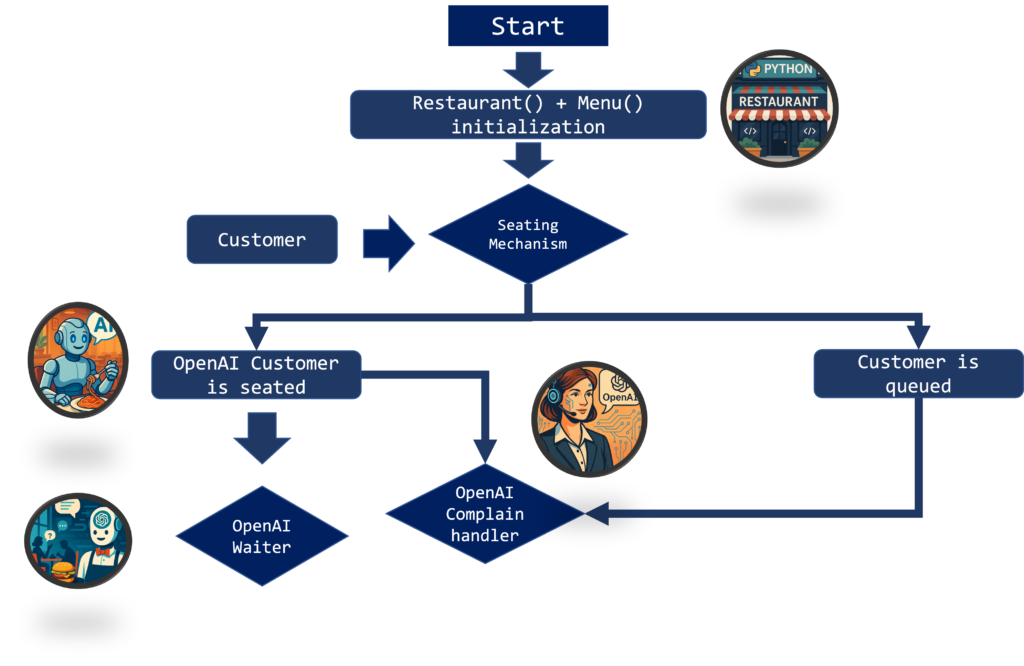
説明させてください:
- レストラン() و メニュー() それらは2つのクラスです。これらを定義すると、クラス内のすべてのテーブル、注文、およびシステム情報が動的に定義および更新されます。
- しなければならないだろう 新規顧客 座席機構を通過します。彼らが座れるなら(十分な空きテーブルがあれば)、それは素晴らしいことです、彼らに座らせてあげることができます。それ以外の場合、顧客は列に並んで待つことになります。
- お客様のために 座っているウェイターがいて、食べ物を注文することができます。注文後、料理が出てくるまでどのくらい時間がかかるのかを「苦情」として尋ねることができます。
- 人々はできない 列に並んで待つ 彼らはいろいろなことをしますが、「不満を言う」こともでき、座るまでにどれくらい列に並ばなければならないかを尋ねることもできます。
考えてみれば、あなたは 必要 この目的のために大規模言語モデル (LLM) を使用します。たとえば、事前に待機時間を計算し、それを事前に定義されたフォーマットされた文字列に接続することができます。シンプルなメニューを使用して注文を収集することもできます (マクドナルドの自動キオスクのように)。もちろん、それは可能ですが、よく考えてみてください。
顧客がメニューに関する情報を尋ねたい場合はどうすればよいでしょうか? 待っている間?もしそうだったらどうなるでしょうか? ためらう 食べ物についてですか?もし彼らが知りたいと思ったらどうしますか? 最も美味しいベジタリアンオプション メニューに載っていますか?もし彼らが望んだらどうなるでしょうか? 手頃な価格でおいしいワイン?これらのシナリオごとにルールベースの方法を定義し始めて時間とお金を無駄にするか、人工知能を使い始めるかのいずれかを選択できます。それがこの記事の主題です。大規模言語モデルエージェント (LLM エージェント) を使用すると、これらすべてのシナリオを 1 回のパスで処理できるようになります。
今、私が何かを学んだとすれば、それはソフトウェア エンジニアリングを実行する必要があるということです。 ステップバイステップ。持っていた方が良い スケルトン モデルに装飾やアクセサリを追加します。このため、上記製品のエージェントフリーバージョンを構築します。この簡易バージョンには、待ち時間を計算してメニューを実行するキュー システムが搭載されているため、AI なしですべてがスムーズに実行されます。このステップの後、上で説明して示した場所 (顧客、ホスト、ウェイター) にエージェントを配置できます。
2. エージェントフリー実装
メイン スクリプトではすべてを可能な限り簡素化し、複雑な操作をバックグラウンドに残すのが常に最善です。当社のエージェントフリー実装はこのコードで実行できます。
import random import time import math import sys from utils import * from constants import * from naive_models import * if __name__ == "__main__": random.seed(42) menu = preprocess_menu(MENU_FILE, eat_time_factor=0.5) R = Restaurant( num_tables=2, arrive_prob=0.7, tick_length=1, real_pause=5.0, query_prob=0.4, menu=menu ) R.run(total_time=60)
ご覧のとおり、変更できるのは以下のとおりです。
- num_tables;レストラン内のテーブルの数。
- 到着確率;各タイムステップで顧客が到着する確率です。
- ダニ;これはシミュレーションの時間ステップです。
- 一時停止;実際のレストランのワークフローをシミュレートするために使用される time.sleep() 関数を実装します。
現在、この実装はすべてファイル内で行われます。 ナイーブモデル.py、 既存 ここで.
import random
import time
import math
import sys
from utils import *
from constants import *

class Table:
def __init__(self, id, capacity=1):
self.id = id
self.capacity = capacity
self.is_free = True
self.cust_id = None
self.plate = None
self.cooking_complete_at = None
self.leave_at = None

def seat(self, cust_id, clock, plate, cook_time, eat_time):
self.is_free = False
self.cust_id = cust_id
self.plate = plate
self.cooking_complete_at = clock + cook_time
self._scheduled_eat_time = eat_time
msg = (
f"[{clock:04}m] 🪑 Seated customer {cust_id} at T{self.id} "
f"ordering {plate!r} (cook {cook_time}m, eat {eat_time}m)"
)
print(msg); sys.stdout.flush()

def start_eating(self, clock):
self.leave_at = clock + self._scheduled_eat_time
msg = (
f"[{clock:04}m] 🍽️ Customer {self.cust_id} at T{self.id} "
f"starts eating their {self.plate!r} (leaves at {self.leave_at}m)"
)
print(msg); sys.stdout.flush()

def depart(self, clock):
msg = (
f"[{clock:04}m] 💸 Customer {self.cust_id} finished their "
f"{self.plate!r} and left T{self.id}"
)
print(msg); sys.stdout.flush()
self.is_free = True
self.cust_id = None
self.plate = None
self.cooking_complete_at = None
self.leave_at = None

class Restaurant:
def __init__(self, num_tables, arrival_prob=0.33,
tick_length=1, real_pause=0.5, menu=None,
query_prob=0.0):
self.tables = [Table(i) for i in range(num_tables)]
# queue holds only customer IDs
self.queue = []
self.clock = 0
self.next_cust_id = 1
self.arrival_prob = arrival_prob
self.tick = tick_length
self.pause = real_pause
self.menu = menu or [
("Burger", 2, 4),
("Pasta", 3, 5),
("Salad", 1, 2),
("Steak", 4, 6),
("Soup", 1, 3),
]
self.query_prob = query_prob

total = sum(c + e for _, c, e in self.menu)
self.avg_service_time = total / len(self.menu)

def open_tables(self):
return [t for t in self.tables if t.is_free]

def _pick_dish(self):
return random.choice(self.menu)

def arrive(self):
if random.random() < self.arrival_prob:
cid = self.next_cust_id
self.next_cust_id += 1
free = self.open_tables()
if free:
# pick dish only when seating immediately
plate, cook_time, eat_time = self._pick_dish()
table = min(free, key=lambda t: t.capacity)
table.seat(cid, self.clock, plate, cook_time, eat_time)
else:
self.queue.append(cid)
print(f"[{self.clock:04}m] ⏳ Queued customer {cid} (waiting)")

def process_cooking(self):
for t in self.tables:
if (not t.is_free
and t.cooking_complete_at is not None
and t.cooking_complete_at <= self.clock
and t.leave_at is None):
t.start_eating(self.clock)

def process_departures(self):
for t in self.tables:
if (not t.is_free
and t.leave_at is not None
and t.leave_at <= self.clock):
t.depart(self.clock)

def seat_from_queue(self):
while self.queue and self.open_tables():
cid = self.queue.pop(0)
# pick dish at seating time
plate, cook_time, eat_time = self._pick_dish()
table = min(self.open_tables(), key=lambda t: t.capacity)
table.seat(cid, self.clock, plate, cook_time, eat_time)

def estimate_queue_time(self, cid):
positions = list(self.queue)
idx = positions.index(cid)
raw_wait = (idx + 1) * self.avg_service_time / len(self.tables)
return math.ceil(raw_wait)

def estimate_food_time(self, cid):
for t in self.tables:
if t.cust_id == cid:
if t.cooking_complete_at > self.clock:
return t.cooking_complete_at - self.clock
return max(0, t.leave_at - self.clock)
return None

def handle_random_query(self):
queue_ids = list(self.queue)
seated_ids = [t.cust_id for t in self.tables if not t.is_free]
if queue_ids and (not seated_ids or random.random() < 0.7):
cid = random.choice(queue_ids)
wait = self.estimate_queue_time(cid)
print(f"[{self.clock:04}m] ❓ Customer {cid}: How long will I be in line?")
print(f"[{self.clock:04}m] ➡️ Estimated wait for customer {cid}: {wait}m")

elif seated_ids:
cid = random.choice(seated_ids)
wait = self.estimate_food_time(cid)
table = next(t for t in self.tables if t.cust_id == cid)
food = table.plate
print(f"[{self.clock:04}m] ❓ Customer {cid}: How long will the {food} take me?")
if wait is None:
print(f"[{self.clock:04}m] ➡️ Ready now!")
else:
print(f"[{self.clock:04}m] ➡️ Estimated food wait for customer {cid}: {wait}m")

def tick_once(self):
self.arrive()
self.process_cooking()
self.process_departures()
self.seat_from_queue()
if self.query_prob and random.random() < self.query_prob:
self.handle_random_query()
self.clock += self.tick
time.sleep(self.pause)

def run(self, total_time):
while self.clock < total_time:
self.tick_once()
print("n--- END OF SHIFT ---")
free = sum(t.is_free for t in self.tables)
print(f"{free}/{len(self.tables)} tables free at {self.clock}m.")

if __name__ == "__main__":
random.seed(42)
menu = preprocess_menu(MENU_FILE, eat_time_factor=0.5)
R = Restaurant(
num_tables=2,
arrival_prob=0.7,
tick_length=1,
real_pause=5.0,
query_prob=0.4,
menu=menu
)
R.run(total_time=60)
長くなりましたが、いくつかの手順を順に説明させてください。
スクリプト全体はnaive_sim上で以下のコマンドを使って実行される。 。走る() 以下の機能を備えています:
- 到着するは、顧客の到着とリクエスト、または顧客の到着とキューへの配置を表します。
- 調理プロセス各テーブルの調理をシミュレーションするシステムです。
- プロセス出発顧客の離脱をシミュレートします。
- 列から離れた座席列に並んで座っている顧客をシミュレートします。
- ランダムクエリを処理するランダムに呼び出され、列に並んでいる顧客や食べ物を待っている顧客が待ち時間について尋ねることができます。
naive_sim.py を実行すると、ターミナルからこれが取得されます。
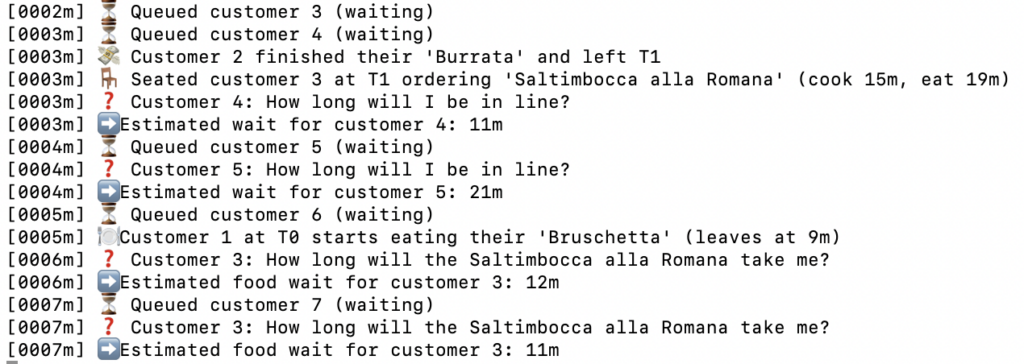
さて、これはそれ自体がデータ サイエンス製品です。これを使ってモンテカルロチェーンを実行し、長い行列ができる可能性を確認したり、レストランは自分のレストランのこの「デジタルツイン」を使用して、重大な事態が発生する可能性がある時期を確認したりできます。実用的な製品が完成したので、人工知能 (AI) を使用して、さらに美しく強力な製品にしましょう。
3. エージェントレストランの実装
上記のように、顧客はすでに質問することができ、その答えは数値として得られます。顧客はまた、当社のシステムでランダムに食べ物を選択します。それでは、このシステムにエージェントを追加してみましょう。レストラン エージェント システムをアクティブ化することは、顧客サービスの自動化とユーザー エクスペリエンスの向上における高度なステップです。訓練を受けたエージェントは、顧客の問い合わせに効率的に回答し、パーソナライズされた推奨事項を提供できます。
3.1 専用エージェントの実装
「エージェント」モジュールをインストールする必要があります。
以下は、カスタマー サービス エージェント、エンターテイメント エージェント、苦情処理担当者の実装です。
# custom_agents.py import os, json from openai import OpenAI from agents import Agent from newtools import * client = OpenAI(api_key=os.getenv("OPENAI_API_KEY"), default_headers={"OpenAI-Beta":"assistants=v2"}) menu_agent = Agent(name = "Chef_suggester", instructions = "あなたは、当店のことを何でも知っていて、お客様が料理を選ぶのを手伝ってくれる親切なサーバーです。まず、丁寧に" "フードバーチャルアシスタントとして自己紹介し、お客様に丁寧に挨拶します。お客様のお名前は、msg json ファイルに記載されています。" "メニューを読み、お客様の質問に基づいて、json ファイルのリクエストキーを入力します。" "お客様が不適切な質問をしている場合は、「unsuccessfull」という json 形式を出力します '{food: 、 状態: }'", tools = [get_menu]) entertainer_agent = Agent(name = "エンターテイナー", instructions = ("あなたはお客様が待っている間、忙しくさせてくれる親切なサーバーです。" "割引やオファーを提供することはできませんが、get_menu関数で取得できるメニューについて質問することはできます。また、入店までの待ち時間がどれくらいかかるか尋ねることもできます。その情報はwaiting_timeに含まれています。" "user_statusが「queue」の場合は、待ち時間に基づいて親切に時間を伝えてください。そうでない場合、" "user_statusが「food」の場合は、お客様が料理を待っていることを意味します。「order」をチェックし、待ち時間に関する面白い情報を提供してください。" "例えば、「パスタの待ち時間は1分です。シェフがソースをかけているようです!」", tools = [get_menu]) customer_agent = Agent(name = "顧客", instructions = ("あなたはお客様で、イタリアンレストランで食事をしています。 get_menu関数を使ってメニューを見てください。すでに欲しいものが決まっていれば、ウェイターに伝えてください。それ以外の場合は、大まかな指示を与えるか、好みに基づいてアドバイスを求めると、最適なものを選んでくれます。(tools = [get_menu]) def call_agent(runner, msg, class_agent = "wait"): if class_agent == "entertainer": return runner.run_sync(entertainer_agent, msg) elif class_agent == "waiter": return runner.run_sync(menu_agent, msg) elif class_agent == "customer": return runner.run_sync(customer_agent, '')
定義がある クライアントこれはOpenAIのクライアント呼び出しであり、 新しいツール.pyをクリックするとリストが表示され、 コールエージェント 個々のエージェントを呼び出して操作する ランナー。これらのコンポーネントは、効果的なエージェント システムを作成するために不可欠です。
これはまさに冒頭でお話しした内容です。私たちはいくつかの エージェント 彼らは接続され、使用しています ツール 私のコードによって定義されます。これらのツールとエージェントを使用すると、顧客サービスのタスクを自動化し、ユーザー エクスペリエンスを向上させることができます。
from agents import function_tool from constants import * import pandas as pd @function_tool def get_menu(): df = pd.read_csv(MENU_FILE) # 辞書のリスト(またはJSONシリアル化可能な構造)に変換します return df.to_dict(orient="records")
3.2 専用エージェントの実装
実装は統合されています 表 و レストラン 次のコードにエージェントが含まれます。
import random import time import math import sys from utils import * from constants import * import time, random, json from custom_agents import * from utils import * from constants import * from agents import Runner # NAMES 定数からの最初の名前のリスト # NAMES = [ ... と想定します ] is defined in constants.py
import logging
# Set up logging
def log(msg):
logging.info(msg)
class Table:
def __init__(self, id, capacity=1):
self.id = id
self.capacity = capacity
self.is_free = True
self.cust_id = None
self.orders = [] # list of (plate, cook_time, eat_time)
self.current_phase = None # "cooking" or "eating"
self.cooking_complete_at = None
self.leave_at = None
def seat(self, cust_id, cust_name, clock, orders):
self.is_free = False
self.cust_id = cust_id
self.orders = list(orders) # copy the list of tuples
# start first dish cooking immediately
plate, cook_time, eat_time = self.orders.pop(0)
self.current_phase = "cooking"
self._scheduled_eat_time = eat_time
self._remaining_orders = self.orders # save the tail
self.cooking_complete_at = clock + cook_time
self.leave_at = None
msg = (f"[{clock:04}m] 🪑 Seated {cust_name} (#{cust_id}) at T{self.id} "
f"ordering {len(orders)} dishes; first: {plate!r} "
f"(cook {cook_time}m, eat {eat_time}m)")
print(msg); sys.stdout.flush()
def start_eating(self, clock):
self.current_phase = "eating"
self.leave_at = clock + self._scheduled_eat_time
plate = self.plate if hasattr(self, 'plate') else "dish"
msg = (f"[{clock:04}m] 🍽️ {plate!r} ready for {self.cust_name} "
f"(#{self.cust_id}) at T{self.id}, eating until {self.leave_at}m")
print(msg); sys.stdout.flush()
def finish_phase(self, clock):
"""Called when eating of current dish finishes."""
if self._remaining_orders:
# move to next dish
plate, cook_time, eat_time = self._remaining_orders.pop(0)
self.current_phase = "cooking"
self._scheduled_eat_time = eat_time
self.cooking_complete_at = clock + cook_time
self.leave_at = None
self.plate = plate
msg = (f"[{clock:04}m] 🔄 Next dish for {self.cust_name} (#{self.cust_id}) "
f"at T{self.id}: {plate!r} (cook {cook_time}m, eat {eat_time}m)")
print(msg); sys.stdout.flush()
else:
# no more dishes: depart
msg = (f"[{clock:04}m] 💸 {self.cust_name} (#{self.cust_id}) "
f"finished all dishes and left T{self.id}")
print(msg); sys.stdout.flush()
self.is_free = True
self.cust_id = None
self.orders = []
self.current_phase = None
self.cooking_complete_at = None
self.leave_at = None
class Restaurant:
def __init__(self, num_tables, arrival_prob=0.33,
tick_length=1, real_pause=0.5, menu=None,
query_prob=0.0):
self.tables = [Table(i) for i in range(num_tables)]
self.queue = [] # just customer IDs
self.clock = 0
self.next_cust_id = 1
self.arrival_prob = arrival_prob
self.tick = tick_length
self.pause = real_pause
self.menu = menu or [
("Burger", 2, 4),
("Pasta", 3, 5),
("Salad", 1, 2),
("Steak", 4, 6),
("Soup", 1, 3),
]
self.runner = Runner()
self.query_prob = query_prob
self.names = {}
self.load_logging()
def load_logging(self):
logging.getLogger("httpx").setLevel(logging.WARNING)
logging.getLogger("openai").setLevel(logging.WARNING)
logging.getLogger("urllib3").setLevel(logging.WARNING)
logging.basicConfig(level=logging.INFO, format='[%(asctime)s] %(message)s',
datefmt='%H:%M:%S', handlers=[
logging.FileHandler("restaurant_log.txt", mode='w'),
logging.StreamHandler(sys.stdout)])
def log_to_msg(self,msg):
logging.info(msg)
def open_tables(self):
return [t for t in self.tables if t.is_free]
def _pick_orders(self, cname):
"""Choose between 1–3 random menu items as a list."""
#n = random.randint(1, 3)
#return random.sample(self.menu, n)
customer_text = call_agent(runner = self.runner, msg= '', class_agent="customer").final_output
msg = f'The customer {cname} is talking to the waiter, saying this {customer_text}'
print(msg)
self.log_to_msg(msg)
menu_asker_output = call_agent(runner = self.runner, msg = json.dumps(customer_text), class_agent="waiter").final_output
output = extract_json_dict(menu_asker_output)
msg = f'The processed response from our LLM is {output}'
print(msg)
self.log_to_msg(msg)
if output['status'] == 'successfull':
return filter_menu_items(output['food'])
else:
n = random.randint(1, 3)
return random.sample(self.menu, n)
def _assign_name(self, cid):
name = random.choice(NAMES)
self.names[cid] = name
return name
def arrive(self):
if random.random() < self.arrival_prob:
cid = self.next_cust_id
self.next_cust_id += 1
cname = self._assign_name(cid)
free = self.open_tables()
if free:
orders = self._pick_orders(cname)
table = min(free, key=lambda t: t.capacity)
table.cust_name = cname
plate, cook_time, eat_time = orders[0]
table.plate = plate
table.seat(cid, cname, self.clock, orders)
else:
self.queue.append(cid)
msg = f"[{self.clock:04}m] ⏳ Queued {cname} (#{cid}) – waiting"
print(msg)
self.log_to_msg(msg)
def process_cooking(self):
for t in self.tables:
if (not t.is_free and
t.current_phase=="cooking" and
t.cooking_complete_at <= self.clock):
# cooking done → start eating
t.cust_name = self.names[t.cust_id]
t.start_eating(self.clock)
def process_departures(self):
for t in self.tables:
if (not t.is_free and
t.current_phase=="eating" and
t.leave_at <= self.clock):
t.cust_name = self.names[t.cust_id]
t.finish_phase(self.clock)
def seat_from_queue(self):
while self.queue and self.open_tables():
cid = self.queue.pop(0)
cname = self.names[cid]
orders = self._pick_orders(cname=cname)
table = min(self.open_tables(), key=lambda t: t.capacity)
table.cust_name = cname
plate, cook_time, eat_time = orders[0]
table.plate = plate
table.seat(cid, cname, self.clock, orders)
def estimate_queue_time(self, cid):
# same logic as before: position in queue × avg service
avg = sum(c+e for _,c,e in self.menu) / len(self.menu)
idx = self.queue.index(cid)
return math.ceil((idx+1)*avg/len(self.tables))
def estimate_food_time(self, cid):
for t in self.tables:
if t.cust_id == cid:
# if they’re still cooking, time until cook‐done
if t.current_phase == "cooking":
return max(0, t.cooking_complete_at - self.clock)
# if they’re eating, time until they finish eating
if t.current_phase == "eating":
return max(0, t.leave_at - self.clock)
return None
def handle_random_query(self):
queue_ids = list(self.queue)
seated_ids = [t.cust_id for t in self.tables if not t.is_free]
if queue_ids and (not seated_ids or random.random() < 0.7):
cid = random.choice(queue_ids)
wait = self.estimate_queue_time(cid)
cname = self.names[cid]
msg = f"[{self.clock:04}m] ❓ Customer {cid}: How long will I be in line?"
print(msg) self.log_to_msg(msg) msg = f"[{self.clock:04}m] ➡️ 顧客 {cid} の推定待ち時間: {wait}m" print(msg) self.log_to_msg(msg) waiting_message = { "customer_id": cid, "customer_name": cname, "type": "line", "wait_min": wait, "next_food": None } output_llm = call_agent(class_agent="entertainer", runner = self.runner, msg = json.dumps(waiting_message)) msg = f"LLM が {cname} を次のように処理しました: {output_llm}" print(msg) self.log_to_msg(msg) elif seated_ids: cid = random.choice(seated_ids) wait = self.estimate_food_time(cid) table = next(t for t in self.tables if t.cust_id == cid) food = table.plate cname = self.names[cid] msg = f"[{self.clock:04}m] ❓ 顧客 {cid}: 料理が出るまでどのくらい時間がかかりますか?"
print(msg) self.log_to_msg(msg) if wait is None: msg = f"[{self.clock:04}m] ➡️ 準備完了!"
print(msg) self.log_to_msg(msg) else: msg = f"[{self.clock:04}m] ➡️ 顧客 {cid} の料理の待ち時間の見積もり: {wait}m" print(msg) self.log_to_msg(msg) waiting_message = { "customer_id": cid, "customer_name": cname, "type": "line", "wait_min": wait, "next_food": food } output_llm = call_agent(class_agent="entertainer", runner = self.runner, msg = json.dumps(waiting_message)) msg = f"LLM が {cname} を次のように処理しました: {output_llm}" print(msg) self.log_to_msg(msg) def tick_once(self): self.arrive() self.process_cooking() self.process_departures() self.seat_from_queue() self.query_prob かつ random.random() < self.query_prob の場合: self.handle_random_query() self.clock += self.tick time.sleep(self.pause) def run(self, total_time): while self.clock < total_time: self.tick_once() free = sum(t.is_free for t in self.tables) msg = f"n--- シフト終了 ---{self.clock}m で n{free}/{len(self.tables)} テーブルが空いています。"
print(msg) self.log_to_msg(msg) if __name__ == "__main__": random.seed(42) menu = preprocess_menu(MENU_FILE, eat_time_factor=0.5) R = Restaurant( num_tables=5, arrive_prob=0.7, tick_length=1, real_pause=5.0, query_prob=0.8, menu=menu ) R.run(total_time=60)
3.3 大規模言語モデル(LLM)を用いたレストラン向けグラフィカルユーザーインターフェース(GUI)の実装
大規模言語モデル (LLM) アプリケーションを使用してレストランのパフォーマンスを表示するには、シンプルなグラフィカル ユーザー インターフェイス (GUI) を使用します。
from llm_models_gui import RestaurantGUI from utils import * import random from llm_models import Restaurant if __name__ == "__main__": random.seed(42) menu = preprocess_menu(MENU_FILE, eat_time_factor=0.5) R = Restaurant( num_tables=5, arrived_prob=0.7, tick_length=1, real_pause=1.0, # GUI 用にスムーズ化 query_prob=0.8, menu=menu ) app = RestaurantGUI(R)
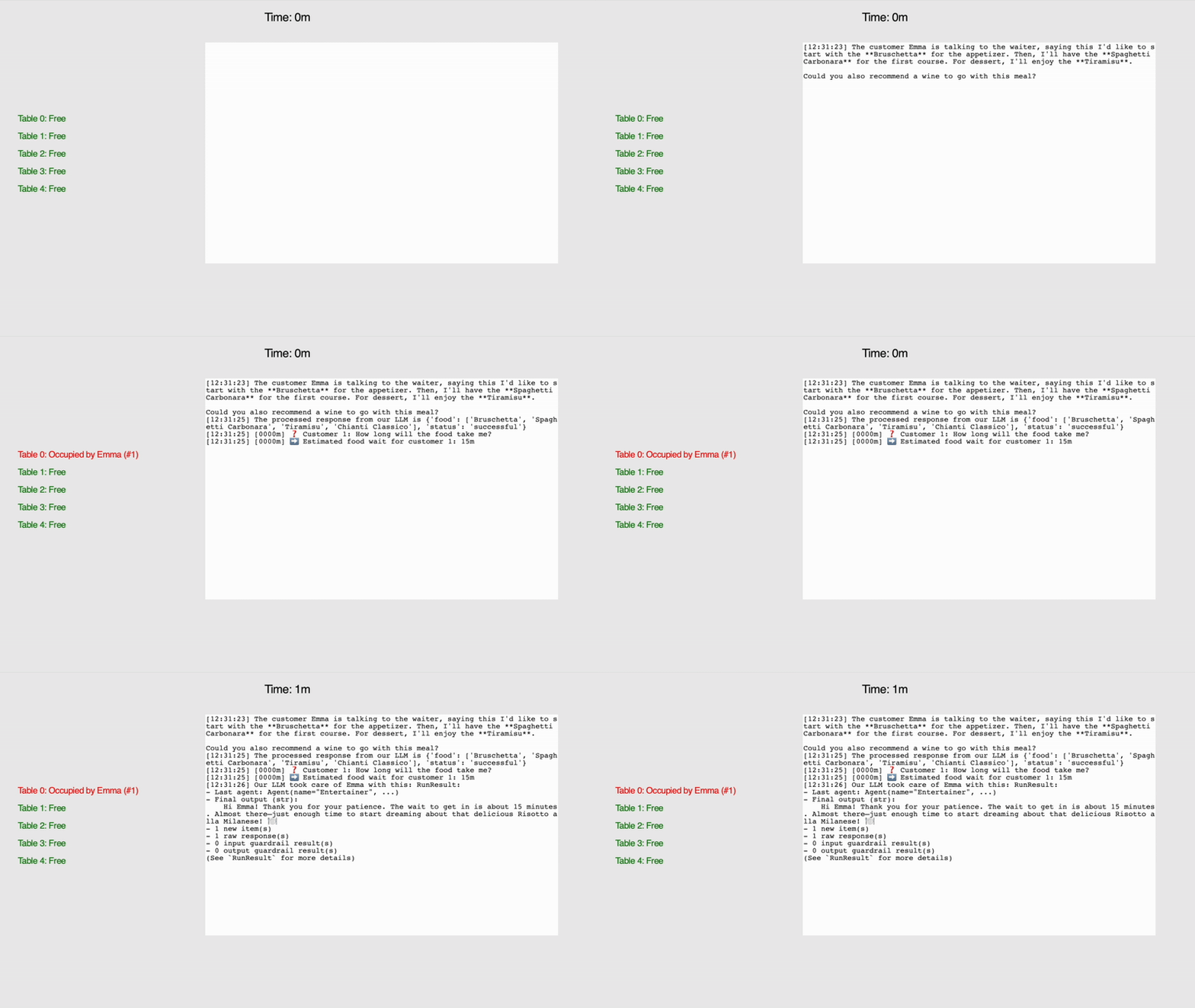
グラフィカル ユーザー インターフェイス (GUI) では、人物 (Emma)、テーブル、時間、大規模言語モデル (LLM) の出力に関する情報が提供されます。 .txt レコードも自動的に作成されます。
出力の例を示します。
[12:31:23] お客様のエマさんが店員に「前菜はブルスケッタからお願いします。それから、コースのメインはスパゲッティ・カルボナーラをお願いします。デザートはティラミスをお願いしたいです。この料理に合うワインも教えていただけますか?」と尋ねました。 [12:31:25] 修士課程の学生からの処理済みの回答は次のとおりです: {'food': ['Bruschetta', 'Spaghetti Carbonara', 'Tiramisu', 'Chianti Classico'], 'status': 'successful'} [12:31:25] [0000M] ❓ 顧客 1: 料理の準備にはどのくらい時間がかかりますか? [12:31:25] [0000M] ➡️ 顧客の予想料理待ち時間 1:15 分 [12:31:26] LLM の学生がエマの注文に対応しました: 最後の顧客: エージェント (名前 = ”エンターテイナー”, …) 最終結果 (文字列): こんにちは、エマさん! ご辛抱いただきありがとうございます。 入場待ち時間は約15分です。 もうすぐ到着です。おいしいブルスケッタを夢見始めるのにちょうどいい時間です! 🍽️
弊社がご提供できるもの:
- 顧客はエージェントを通じて独自のメニューを作成します。そしてウェイターのエージェントに推薦を依頼します。
- ウェイターはキャンティワインを勧め、リストに追加します。
- 苦情処理担当者は顧客に待機期間を通知します。
今では、以前のようにワークフローをシミュレートするだけではなく、ワークフローが存在します。 賢い同じ ChatGPT テクノロジーを搭載しています。それは素晴らしいことじゃないですか?
4. 結論
来てくれて本当にありがとう、私にとってとても意味のあることです❤️。
戻って、この記事で何をしたかを見てみましょう。
- レストランシステム設計:
AI エージェントを追加した PowerPoint を使用して、レストラン システムの簡単な設計を作成しました。 - エージェントフリーベース:
まず、キュー、調理時間、テーブルの回転のロジックをコーディングできるように、決定論的なシミュレーションを構築しました。これは AI を実行する前のスケルトンです。 - エージェントベースのレストラン:
この段階では、AI エージェントを使用して、苦情 + アクション ケースにエージェントを入力しました。結果を明確に表示するためのグラフィカル ユーザー インターフェイスも作成しました。
さて、この時点で、私は非常に明確にしておきたいことがあります。これはちょっと『ブラックミラー』に似ていると思います。顧客シミュレーション?レストランとウェイターのシミュレーション?はい、奇妙ですね。 だが 問題となるのは AI ツールそのものではなく、常にそれがどのように使用されるかです。人間のウェイターを AI に置き換えるのは負け戦だと思います。
ウェイターの仕事は、単に注文を受けて、これまでに注文された N-1 本のワインに基づいて N 番のワインを勧めるだけではありません。大切なのは、ゲストに歓迎されていると感じさせるほど温かく、会話を邪魔しない程度に距離を保ち、くつろげるほど優しく、境界線を尊重してもらうほどに強くすることです。それは、人間的な感触、忍耐、共感を必要とする資質の組み合わせだと私は信じています。
しかし、この技術を正しく使用するには、次の 2 つの方法があると考えています。
- 待機リストに載っている実際の人々を支援します。 店内のウェイターは非常に忙しく、レストランではテーブルを待つ間に見るためのメニューがすでに用意されており、他のウェイターがテーブルなしで待っている人をもてなしていると考えるのは非現実的です。この時点で、チャットできる AI コンパニオンが役に立ちます。
- レストランシミュレーション。私が書いたシナリオは 動作 お客様 また。つまり、シミュレーションを使用してさまざまなシナリオをテストし、いつ行列が形成されるかを確認し、人々のさまざまな反応やウェイターのさまざまな対応などを想定できる可能性があります。言い換えれば、これはテストを実行する「デジタルツイン」になる可能性があります。

コメントは締め切りました。